


Best Quality GBU08 1000V Bridge Rectifier With Affordable Price
Are you working on an electronics project that needs a reliable and efficient way to convert alternating current (AC) to direct current (DC)? Look no further than the GBU08 1000V bridge rectifier,…

At SunTech Mall, we talk to inverter repair technicians every day, and one story keeps repeating: a dead inverter comes in, and the culprit is a small black square near the AC input — the bridge rectifier. Often, that part is the GBU08.
We supply genuine components to workshops across Pakistan, so we see which parts fail most and which replacements survive. Bridge rectifiers sit at the front of every power supply, taking the full hit of incoming mains power. When they go, everything behind them goes dark.
What worries beginners: four legs, cryptic markings, a complicated-sounding job. Pick the wrong replacement, skip the heatsink, or install a fake, and the repair fails again — sometimes taking the MOSFETs behind it down too.
This guide removes that fear. You will learn what a bridge rectifier does, what the GBU08’s specs mean in plain language, how to test one with a multimeter in two minutes, how to keep it cool, and how to buy a genuine one in Pakistan.
Let’s start with the clever little circuit hiding inside that black square.
Every spec here comes from manufacturer datasheets (Vishay and onsemi publish the GBU8 series) plus daily feedback from technicians across Pakistan. No invented numbers.
- See How a Bridge Rectifier Turns AC Into DC
- Understand GBU08 Specs in Plain Language
- Know Where the GBU08 Is Used
- Test a GBU08 With Your Multimeter in 2 Minutes
- Keep Your Rectifier Cool So It Survives
- Buy a Genuine GBU08 in Pakistan
- Frequently Asked Questions
See How a Bridge Rectifier Turns AC Into DC
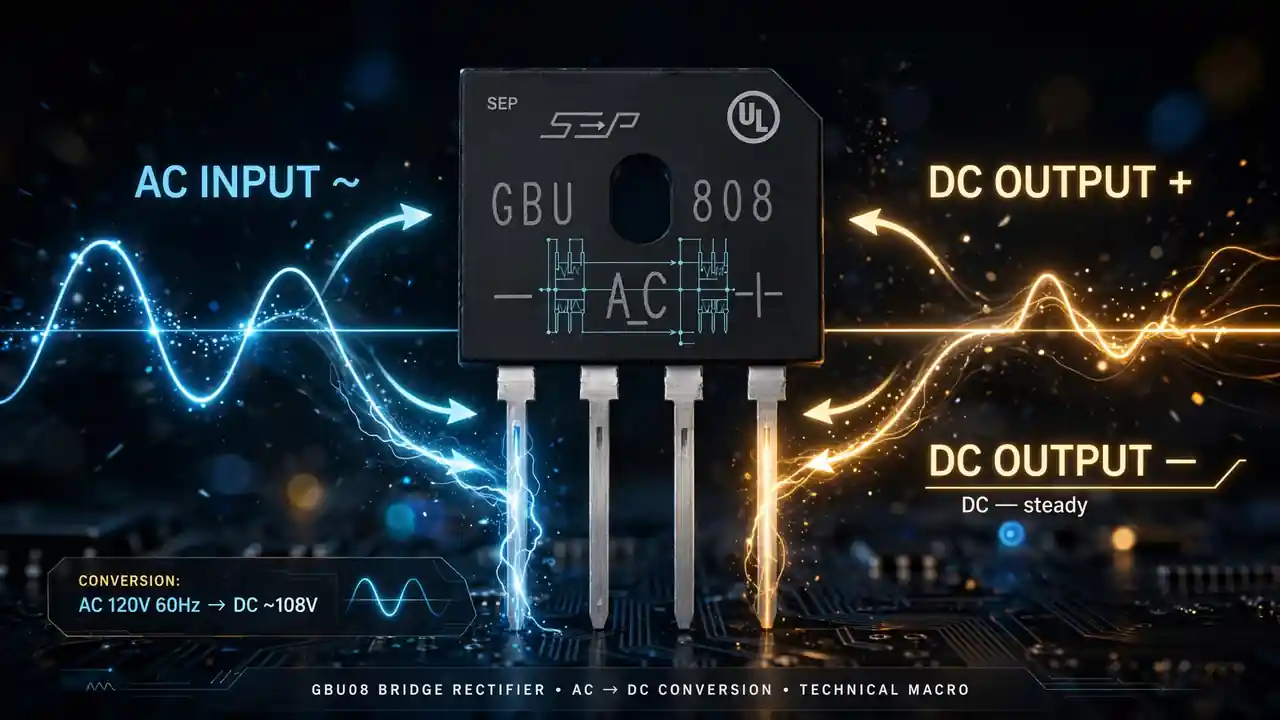
Your wall socket gives you AC — alternating current. It flows one way, then reverses, fifty times every second. But almost every electronic circuit needs DC — direct current, flowing one way only. The bridge rectifier is the part that performs this conversion.
Inside the GBU08 sit four diodes in a diamond called a bridge configuration. Diodes are one-way valves: they pass current in one direction and block it in the other.
Here is the clever part. When AC swings positive, two diodes conduct and route current to the positive output. When it swings negative, the other two conduct — routing current to the same positive output. Both halves of the wave end up pushing one way.
The result is full-wave rectified DC: still bumpy, pulsing 100 times per second, but all flowing one way. A capacitor after the rectifier smooths those pulses into steady DC — the filtering job in our 50V 22uF capacitor guide.
This four-diode trick is why the GBU08 has four legs: two AC inputs (marked ~ and ~) and two DC outputs (marked + and −). Once you understand the diamond, the pinout makes perfect sense.
Every power supply you have ever used — phone chargers, laptop adapters, inverter input stages — starts with this exact conversion. The bridge rectifier is the front door of modern electronics.
Understand GBU08 Specs in Plain Language
Datasheets look intimidating. Let’s translate the GBU08’s key specs into words that actually help you.
8A average rectified current. The continuous DC current the part can deliver — plenty for medium-power supplies, chargers, and inverter auxiliary stages. But it assumes proper cooling; without a heatsink the real limit is much lower, as we will see.
1000V maximum reverse voltage (VRRM). The voltage the diodes can block when “off.” A thousand volts gives huge safety margin on 220V mains, where spikes are common in Pakistan — exactly why technicians pick the 1000V version over cheaper 400V or 600V parts.
GBU package. The physical shape: a small black block with four inline legs and a center hole for a mounting screw. That hole is for bolting the part to a heatsink. The package suits through-hole PCB mounting.
Glass passivated. The silicon junctions are sealed with glass, protecting against moisture and contamination for better long-term reliability. It marks a properly made part — and is one thing fakes often skip.
200A surge current. At power-up, empty capacitors gulp a huge current spike. The GBU08 survives 200-amp spikes lasting milliseconds — the rating that separates a real rectifier from one that dies on first switch-on.
−55°C to +150°C operating range. The part works from freezing to serious heat — but “survives” is not “lasts long.” A heatsink is still essential.
When you buy a GBU08, check that these numbers are printed clearly on the part and match a real datasheet. If a seller cannot tell you the voltage and current ratings, walk away.
Know Where the GBU08 Is Used
The GBU08 sits wherever AC mains power enters a device and needs to become DC. That makes it one of the most widely used parts in power electronics.
Solar inverter input stages. In inverters and UPS systems, grid or generator AC passes through a bridge rectifier before processing; it also appears in charger sections. When it shorts, the fuse blows — or worse, the short drives damage deeper into the board.
SMPS power supplies. Every switch-mode supply — LED drivers, CCTV supplies, adapters — starts with a bridge rectifier feeding a high-voltage capacitor. The GBU08’s 1000V rating makes it a natural fit.
Battery chargers. Chargers for UPS batteries and solar batteries rectify AC before the charging circuit takes over. A weak rectifier here causes slow charging or overheating.
Audio amplifiers and home appliances. Amplifier power supplies and appliance control boards use them too — our home appliances section covers related categories.
At the very front of the circuit, the bridge rectifier takes the first hit from every surge and wiring fault — which is why it fails so often, and why genuine spares belong in your workshop. Our genuine hybrid solar inverter parts in Pakistan guide lists everything a repair shop should stock.
Test a GBU08 With Your Multimeter in 2 Minutes
No fancy equipment needed: a basic digital multimeter with a diode test mode is enough.
First, disconnect the power and discharge the capacitors. Then identify the four legs: +, −, ~, ~. The markings are printed on top of the package.
Remember the diamond: two diodes connect each ~ leg to the + leg, and two connect each ~ leg to the − leg. You are testing four diodes, one at a time.
Step 1: Red probe on the − leg, black on one ~ leg: a good diode reads 0.5 to 0.7 volts. Swap the probes — expect OL (open). One diode tested good.
Step 2: Repeat on the other ~ leg. Diode two.
Step 3: Red on one ~ leg, black on +: expect 0.5–0.7V, then OL swapped. Diode three.
Step 4: Repeat on the other ~ leg. Diode four.
Reading the results: all four good means the rectifier is fine — look elsewhere. Near 0V both ways means shorted; OL both ways means open. Either way, replace the rectifier.
Test out of circuit if possible, or with one leg lifted — other board components can fool your meter.
Practice on a known-good rectifier first. Once the pattern is in your hands, you will diagnose bridges in under two minutes — a skill that pays for itself.
Bonus Tip: A rectifier that tests good can still fail under load from overheating. If a device dies after ten minutes, check the rectifier’s temperature carefully — overheating points to a missing or undersized heatsink, not a bad part. Check cooling before blaming the component.
Keep Your Rectifier Cool So It Survives
The spec-sheet secret most beginners miss: the 8A rating only applies with proper cooling. Conversion wastes some power as heat, and at several amps that heat adds up fast.
The GBU’s center mounting hole exists for this: bolt the part to a metal heatsink with a screw and a thin layer of thermal paste. This pulls heat away from the silicon inside.
Without a heatsink, only the small plastic body sheds heat — an uncooled GBU08 at just 2 to 3 amps can run hot enough to die young. Many “mystery” repeat failures are rectifiers slowly cooking themselves.
The rules are simple. Use the mounting hole above about 2 amps. Apply a rice-grain of thermal paste, spread thin. Ensure airflow — a heatsink in a sealed box still overheats. And never swap in a smaller package (like round KBP) without checking the current rating.
Copy the original mounting when you repair. If the original had a heatsink and someone removed it, put one back — that single screw separates a repair lasting years from one lasting weeks.
Buy a Genuine GBU08 in Pakistan
Bridge rectifiers are heavily counterfeited. A fake GBU08 looks identical outside — but inside, the dies are smaller, glass passivation is missing, and the real voltage rating may be half of what is printed.
The fake works for days or weeks, then shorts without warning — taking the fuse, or the MOSFETs behind it. Your cheap part just caused an expensive repair.
Protect yourself: check the markings. Genuine parts carry sharp laser-etched markings with full part number, logo, and date codes. Blurry ink, missing logos, or no date code are red flags.
Check the weight and finish. A genuine GBU package feels solid and the epoxy has a clean, consistent finish. Fakes often feel lighter with rough molding edges.
Distrust extreme discounts. If one seller offers a third of the market price, you are not getting a bargain — you are getting a relabeled reject.
Buy from a component specialist who understands datasheets and serves professionals — they will not risk their reputation on fakes. At SunTech Mall, we supply genuine parts to technicians; check current price and stock on our website.
Remember: a surge that killed the rectifier may have stressed nearby MOSFETs and capacitors. Our guides on choosing the right power MOSFET and why inverter MOSFETs burn in Pakistan show how to check the whole stage.
Note: Never replace a GBU08 with a lower-rated rectifier “just to test.” A 4A or 600V part may work for a few minutes and then fail under real load — possibly damaging the board. Always replace like-for-like or better: 8A, 1000V, GBU package.
Frequently Asked Questions
What does GBU08 mean?
GBU is the package style (a rectangular block with four inline legs and a mounting hole), and 08 indicates the 8-amp current rating in this naming series. The 1000V version corresponds to the GBU8M in manufacturer datasheets from Vishay and onsemi.
Can I use a GBU08 to replace a smaller bridge rectifier?
Yes, if the pinout and package fit. Upgrading from a 4A or 6A rectifier to an 8A GBU08 is safe and gives you more headroom — as long as the voltage rating is equal or higher and the legs fit the PCB holes.
Why does my bridge rectifier keep failing?
The usual suspects are: no heatsink (overheating), a fake part with inflated ratings, repeated mains surges, or a shorted component downstream (like a failed MOSFET or capacitor) that overloads the rectifier. Fix the cause, not just the symptom.
Do I really need a heatsink for a bridge rectifier?
Above roughly 2 amps of continuous current, yes. The 8A datasheet rating assumes proper cooling. Without it, the part overheats and its real safe current is far lower. Use the mounting hole, thermal paste, and decent airflow.
Can a bad bridge rectifier damage other parts?
Yes. When a rectifier shorts, it can blow fuses, burn PCB tracks, and send surge stress into the MOSFETs and capacitors behind it. Always check the surrounding power stage after replacing a failed rectifier.
Final Thoughts
Look how far you have come: you understand the four-diode bridge, can read the specs, can test a rectifier in two minutes, and know why the heatsink screw matters. That is genuine repair skill.
Most technicians just swap parts and hope. You now diagnose first, then swap with confidence. That difference is what turns a struggling workshop into the shop everyone recommends.
Ready to stock up? Visit SunTech Mall for genuine GBU08 rectifiers, MOSFETs, capacitors, and full inverter spares — all original, fairly priced.
Keep learning with our related guides: the 50V 22uF capacitor guide, lithium vs lead-acid batteries, and utility-scale solar inverter insight. Your bench — and your customers — will thank you.