
Reliable Brushless 12v 0.40A DC Fan for Solar Inverter in Pakistan
Upgrade your solar inverter with a reliable brushless 12v 0.40A DC fan in Pakistan. Enjoy energy-efficient cooling, quiet operation, and durability tailored for local conditions. Learn key features, installation tips, and where…

What Does a 12V 0.40A Brushless DC Fan Do in a Solar Inverter, and When Should You Replace It?
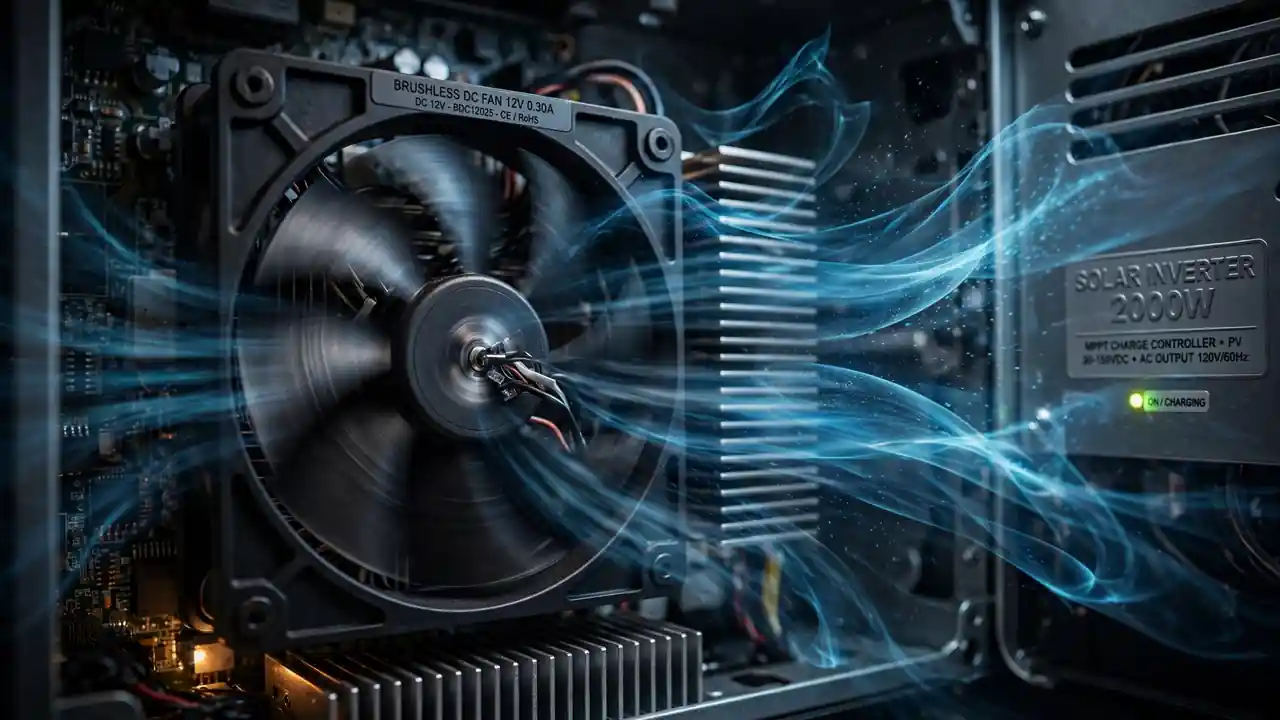
A 12V 0.40A DC fan solar inverter technicians buy is a small cooling fan that runs on 12 volts, draws 0.40 amps (about 4.8 watts), and uses electronic switching instead of carbon brushes. In a solar inverter it pushes air over hot power parts. When it stops, those parts overheat, and a cheap fan failure turns into a costly transistor failure.
This guide explains the rating, why brushless matters, how bearings decide fan life, the warning signs, and how to swap a fan safely.
What does “12V 0.40A brushless DC” mean?
Each word in the rating tells you one fact.
- 12V: the voltage it runs on. Twelve volts is the standard low-voltage rail inside most inverters and UPS units. The inverter’s internal power supply makes this rail for fans, relays, and control circuits.
- 0.40A: the current it draws, which is 400 milliamps. Multiply the two numbers and you get the power: 12 × 0.40 = 4.8 watts. That is a small power draw for a fan that moves real air.
- DC: direct current, not mains AC. DC fans are easy to speed-control and fit neatly into inverter electronics.
- Brushless: the motor type, and the most important word here. Read the next section before you buy any fan.
When you replace a 12V 0.40A DC fan solar inverter uses, match the voltage exactly and match the current closely. A fan that draws far less current moves far less air, so cooling drops. A fan that draws far more current may overload the inverter’s 12V supply. Small differences are normal between brands, but a big jump in either direction is a warning.
Why is brushless better than brushed?
Old DC motors use carbon brushes: small carbon blocks that rub on a spinning part to switch current into the motor coils. The rubbing wears the brushes down, sheds carbon dust, and makes electrical noise. In a fan that runs all day inside a hot inverter, brushes are a weak point.
A brushless motor removes the brushes. Electronic circuits, usually with Hall sensors and a driver chip, switch current into the coils at the right moment. Nothing rubs, so:
- There is no brush wear to end the motor’s life.
- There is no carbon dust inside high-voltage equipment.
- There is less electrical noise near sensitive control circuits.
- Speed control is easy, so the inverter can run the fan slow when cool and fast when hot.
In a 12V 0.40A DC fan solar inverter, the brushless motor is rarely the part that dies. The bearings die first. That makes the bearing type the real lifespan question.
Sleeve bearings vs ball bearings: which lasts longer?
Two fans can look the same and cost nearly the same, yet live very different lives. The difference sits inside the bearing.
| Bearing type | How it works | Typical maker life rating | Best for |
|---|---|---|---|
| Sleeve bearing | The shaft spins inside an oiled sleeve | Around 30,000 hours at moderate temperature in maker specs | Light, cool, low-cost use |
| Ball bearing | Steel balls roll between two races | Around 50,000 hours or more in maker specs, with some types rated higher | Hot, dusty, round-the-clock inverter use |
| Hydraulic bearing | An improved sleeve design with better oil flow | Between sleeve and ball in most maker specs | A middle option when ball types are hard to find |
Treat these hours as maker ratings at moderate temperature, not promises. Heat and dust cut real life short, and different makers rate their fans in different ways. The pattern still holds: ball bearings handle heat, dust, and any mounting angle better than sleeve bearings, and they cost more for that reason.
A fan running all day racks up 8,760 hours in a year. In a hot, dusty inverter cabinet, a sleeve fan may give a few years. A ball fan usually gives more. For an inverter that runs without a break, ask for the bearing type before you buy. It is the best single clue to how long your money will last.
What are the 7 signs your inverter fan needs replacement?
- Strange noise. Grinding, rattling, or clicking means the bearings are failing. A healthy brushless fan hums smooth and even.
- Slow or uneven spin. The fan should start at once and spin steady when the inverter powers up. Hesitation or pulsing points to dying bearings or failing fan electronics.
- Heavy dust on the blades. Dust cuts airflow even when the motor still runs. Clean it first. If cooling does not recover, replace the fan.
- A hotter inverter case. If the case feels much hotter than usual, or the inverter shows over-temperature warnings, check the fan before you suspect anything else.
- No spin at all. First check that 12V reaches the fan connector. Sometimes the supply is at fault, not the fan.
- Age. A fan with four or more years of round-the-clock service, above all a sleeve type, is worth swapping during other maintenance. A planned swap beats a failure.
- Cracked or broken blades. Damaged blades shake, cool poorly, and can break further. Replace the fan at once.
Bonus Tip: a noisy fan is a dying fan. Order the replacement the day the noise starts, not the week after. A 12V 0.40A DC fan solar inverter owners buy costs little. The transistors it guards cost far more.
How do I replace it safely?
High-voltage DC inside an inverter can kill, even after you switch it off. Capacitors hold charge for minutes. If you are not comfortable working inside power equipment, take the unit to a technician. That is the safe choice, not a failure.
If you are trained for this work, follow these steps:
- Cut all power. Disconnect solar input, battery, and AC input. Wait at least 10 minutes for capacitors to drain, then check with a meter rated for high DC voltage. Never trust the switch alone.
- Write down the old fan. Note the old 12V 0.40A DC fan solar inverter label: voltage (12V), current (0.40A), size, wire count (2-wire or 3-wire), connector type, and airflow direction, which is usually marked with an arrow on the frame.
- Remove the old fan. It is usually held by four screws. Unplug the connector and note the wire colours: red is normally positive, black is normally negative.
- Clean while you are in there. Clear dust from heatsinks and vents with compressed air or a soft brush. Clean vents alone can improve cooling a lot.
- Fit the new fan the right way round. Match the airflow arrow to the old fan’s direction. A fan fitted backwards spins fine and pushes air the wrong way. That is a common and costly mistake.
- Wire it right, then test before you close the case. Red to positive, black to negative. Power up briefly and check for smooth, quiet spin. Some brushless fans simply will not start on reversed wires, but check anyway. Then close the case.
One more check: some inverters vary fan speed with temperature. If your new fan runs at full speed all the time, check whether the old fan had a third or fourth wire for speed control or speed sensing, and match that wiring.
How do I pick a good replacement?
- Match the spec. Match the spec of the 12V 0.40A DC fan solar inverter needs. Voltage, current, size, and connector must match. A 12V 0.25A fan in place of a 0.40A fan moves much less air.
- Match the size exactly. Common square sizes are 80 mm, 92 mm, and 120 mm, with different depths. Measure your old fan. A fan that does not fit the screw holes and air path is useless, whatever its electrical rating.
- Ask about bearings. For round-the-clock inverter use, prefer ball bearings. If the seller cannot tell you the bearing type, that tells you something about the seller.
- Check the build. Blades should feel rigid and balanced. The frame should feel solid. Wiring should be insulated with no bare copper showing.
- Buy from a store you can hold to account. A supplier with a reputation to protect sells fans that last. Mystery-market fans are a lottery.
Can I oil a noisy one to make it last longer?
As a short emergency fix, a tiny drop of light machine oil on a sleeve bearing can quiet a fan for weeks. It is a patch, not a cure. Order a proper replacement at the same time, and prefer a ball-bearing type for the swap. The noise will come back, because the bearing is already worn.
Where can I buy a 12V 0.40A DC fan in Pakistan?
Start from your old 12V 0.40A DC fan solar inverter label: 12V, 0.40A, size, wire count, and bearing type if it is printed there. Then judge the store with the five tests in the solar inverter parts store guide. For the parts a dead fan endangers, read the TLP350H optocoupler guide and the chopper transformer guide.
Frequently Asked Questions
What does 12V 0.40A mean on a DC fan?
12V is the running voltage and 0.40A (400 mA) is the current it draws, which works out to about 4.8 watts. Match both numbers closely when you replace a fan, so airflow stays right without overloading the inverter’s power supply.
How long do brushless DC fans last?
The motor itself can last a very long time. Bearings set the limit. Maker ratings are often around 30,000 hours for sleeve bearings and 50,000 hours or more for ball bearings at moderate temperature. Heat and dust shorten real life, so treat those numbers as ratings, not promises.
Can I replace a 0.40A fan with a 0.25A fan?
Not a good idea. The lower current fan moves less air, so cooling drops and power parts run hotter. Hot parts fail sooner. Match the airflow of the original, or beat it slightly without overloading the supply.
Why is my inverter fan so noisy?
In a 12V 0.40A DC fan solar inverter, it is almost always bearing wear, made worse by dust and heat. Clean the blades first, since dust alone can cause shake and noise. If cleaning does not help, the bearings are failing and the fan needs replacement.
Should the fan run all the time, or only when hot?
It depends on the inverter design. Some run fans all the time for simplicity. Better designs vary speed with temperature. If your fan’s behaviour changed, for example it now runs flat out when it used to cycle, check the temperature sensor and control wiring.
What size fan does my inverter need?
Measure the old fan. Common square sizes are 80 mm, 92 mm, and 120 mm, with different depths. Match the size exactly, along with voltage, current, and connector, or the fan will not fit the air path.
Final thoughts
A 12V 0.40A DC fan solar inverter owners rely on asks for little: a few watts, a clean vent now and then, and a swap when its bearings start to talk. In return it guards parts worth far more than itself.
Learn the rating, ask about the bearing, and swap a noisy 12V 0.40A DC fan solar inverter early. That small habit keeps inverters cool, and cool inverters live long.
SunTech Mall supplies spare parts and everything you need at wholesale prices across Pakistan.
Parts you need
Check the live price and stock on the product page:
Related Technical Guides
 Category:
General
Inverter Display Blank 2026: Why Your Screen Goes Dark and How to Fix It
Your inverter display is blank because it has lost power, or the display itself has failed. Check the status lights. If the…
 Category:
General
SPD and Voltage Protection 2026: Save Your Solar Inverter From Power Surges
An SPD, or surge protection device, guards your solar inverter from voltage spikes caused by lightning and grid switching. It sends the…
 Category:
General
Day Solar Inverter Repair 2026: 7 Common Faults and the Real Parts That Fix Them
A Day Solar inverter fails in seven common ways: no output, repeated restarts, heat shutdown, no solar input, blown fuses, strange noise,…
6 Comments
[…] 24V 0.7A brushless fan is the 24V match in the same 80 mm size. A lower-current choice is the Brushless 12V 0.40A DC fan for solar inverters. Check the live price on each product page before you order, and match voltage and size to your old […]
[…] burn, and a 24V fan in a 12V slot will spin too slowly. Common original fans we stock include the brushless 12V 0.40A DC fan for solar inverters and the SASS HD80S24H 24 volt DC […]
[…] will burn, and a 24V fan in a 12V slot will spin too slowly. Common original fans we stock are the brushless 12V 0.40A DC fan for solar inverters, the SASS PL80S12H 12 volt DC fan (80mm, 12V, 2-pin, brushless), and the SASS HD80S24H 24 volt DC […]
[…] 0.40 amps uses about 4.8 watts, because 12 volts times 0.40 amps is 4.8 watts. Our guide on the brushless 12V 0.40A DC fan for solar inverters explains this number in full, and why matching the current closely matters. A fan that draws much […]
[…] steady stock, and a real business behind it. For the parts that fail alongside a driver, read the 12V 0.40A DC fan guide on cooling, and the chopper transformer guide on the inverter’s internal power […]
[…] inverter parts store guide for store tests, the TLP350H optocoupler guide for gate drivers, and the 12V 0.40A DC fan guide for cooling […]